A customer leaves your business a Google review. What happens next?
If your answer is “we reply when someone has time,” you are not alone. For many restaurants, salons, dental clinics, garages, hotels and retail stores, review management sits at the bottom of a long to-do list. Positive reviews receive the same generic thank-you. Difficult reviews wait for the owner. Reviews written in another language may never receive a reply.
But your response is not only for the person who wrote the review. It is also public proof of how your business treats customers. Every potential customer comparing you with a competitor can read it.
The best Google review responses are timely, personal, concise and appropriate to the situation. This guide explains exactly how to write them. You will also find more than 30 adaptable response examples for positive, neutral and negative reviews, plus a practical way to manage reviews across multiple languages and locations.
Why responding to Google reviews matters
Google allows verified businesses to reply publicly to customer reviews. When you reply, the reviewer is notified and can update their review after reading your response. That makes a response more than a courtesy—it is an opportunity to strengthen a good relationship or recover a difficult one.
Consistent review responses can help your business:
Show customers that their feedback is noticed
Build trust with people researching your business
Reinforce your brand voice and service standards
Add useful context without arguing publicly
Identify recurring service problems
Keep each Google Business Profile active and professionally managed
Deliver a consistent experience across multiple branches
Google itself recommends that businesses keep replies professional, polite, clear and helpful. It also advises keeping responses short and simple. The goal is not to win a public debate. The goal is to show that your business listens and responds responsibly.
How to respond to a Google review in five steps
Use this simple framework for almost every review:
- Read the review carefully
Do not respond only to the star rating. A five-star review may contain a suggestion. A three-star review may praise an employee while describing one problem. Identify the customer’s main point before writing.
- Thank the customer
Thank them for visiting, buying or sharing feedback. Even when the review is critical, the customer has given you information that may help improve the business.
- Mention one real detail
Refer to the service, product, staff member or experience the reviewer mentioned. One specific detail makes a response feel genuine and avoids the copy-and-paste effect.
- Match the tone and language
A warm review deserves a warm response. A complaint needs calm, empathetic language. If a customer writes in Arabic, French, Hindi, Spanish or another language, replying naturally in the same language can make the interaction more personal.
- Choose the right next step
For a positive review, invite the customer back. For a mixed review, acknowledge the improvement area. For a serious complaint, move the detailed conversation to a private channel and give the customer a clear way to contact you.
The basic formula is:
Thank you + specific detail + appropriate next step
Positive Google review response examples
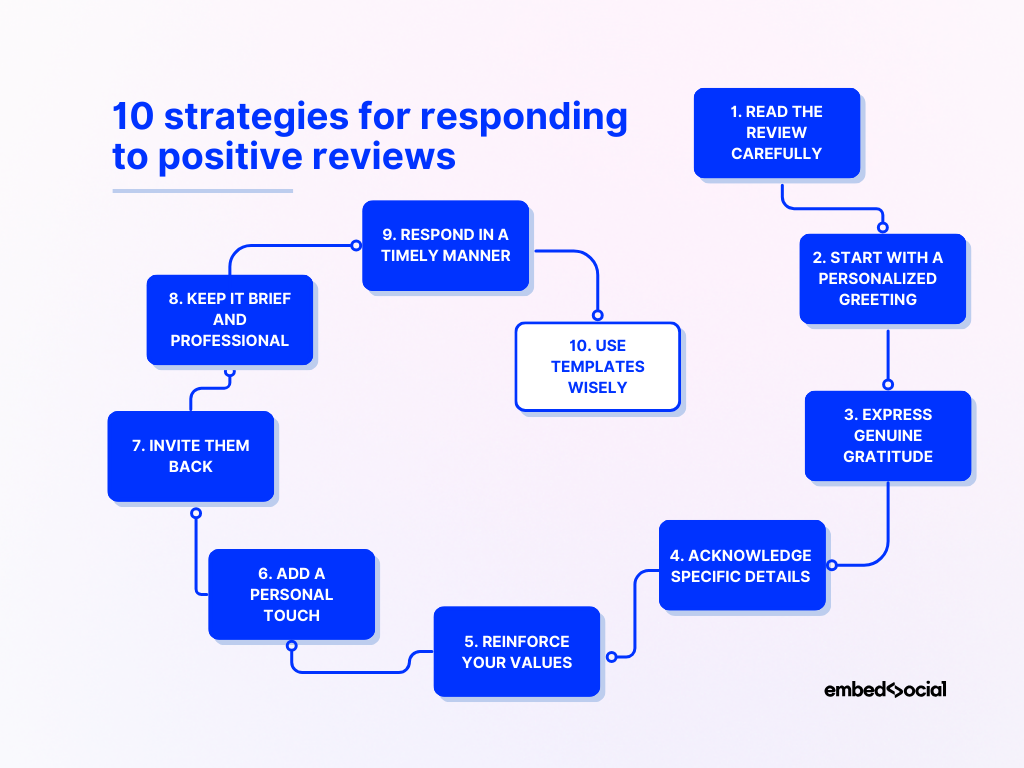
Positive reviews deserve more than a repeated “Thanks!” A good reply reinforces what the customer liked without turning into an advertisement.
Short positive review responses
“Thank you, [Name]! We’re delighted you enjoyed your visit and hope to welcome you back soon.”
“We appreciate the five stars, [Name]. Thank you for choosing [Business Name]!”
“Thank you for your kind feedback. It means a lot to our team.”
“We’re so glad you had a great experience. We look forward to seeing you again.”
“Thank you for taking the time to leave a review, [Name]. We truly appreciate your support.”
Detailed positive review responses
“Thank you, [Name], for your thoughtful review. We’re happy to hear that [specific service or product] met your expectations. We’ll share your kind words with the team and look forward to serving you again.”
“We’re delighted that you enjoyed [specific detail]. Our team works hard to make every visit comfortable and efficient, so your feedback is wonderful to hear. Thank you for choosing [Business Name].”
“Thank you for recognizing [Employee Name]. We’re proud to have them on our team, and we’ll make sure your feedback reaches them. We hope to see you again soon.”
Restaurant review response examples
“Thank you, [Name]! We’re glad you enjoyed the [dish mentioned] and the service. We look forward to welcoming you back for another meal.”
“We appreciate your lovely review. It is great to hear that the food, atmosphere and hospitality made your visit memorable. See you again soon!”
Salon and spa review response examples
“Thank you, [Name]. We’re so pleased you loved your [service]. We’ll pass your kind words to [Stylist Name], and we look forward to your next appointment.”
“We’re delighted that you felt comfortable and well cared for during your visit. Thank you for trusting our team.”
Dental and healthcare clinic response examples
“Thank you for your kind feedback. We’re pleased that our team helped make your visit comfortable and clear. We appreciate your trust in [Clinic Name].”
“Thank you for sharing your experience. Providing attentive, professional care is important to our team, and we’re glad you felt supported.”
For healthcare businesses, keep responses general. Never reveal or confirm private health, treatment or appointment information in a public reply.
Hotel review response examples
“Thank you for staying with us, [Name]. We’re delighted that you enjoyed [room, breakfast, location or staff detail]. We hope to welcome you back on your next visit to [City].”
“We appreciate your wonderful review. It was a pleasure hosting you, and we’re glad our team helped make your stay enjoyable.”
Auto garage review response examples
“Thank you, [Name]. We’re glad our team explained the work clearly and completed your service efficiently. We appreciate your trust and look forward to helping you again.”
“Thank you for recommending us. Honest advice and dependable service are priorities for our team, so your feedback means a great deal.”
How to respond to a negative Google review
A negative review can feel personal, especially when you believe it is unfair. Pause before replying. A defensive answer may attract more attention than the original complaint.
Use this six-part framework:
Respond calmly and promptly.
Thank the customer for the feedback.
Acknowledge the experience or frustration.
Apologize when appropriate without guessing or making unsupported admissions.
State what you can do next.
Move account-specific or sensitive details to a private conversation.
Negative Google review response examples
“Hi [Name], thank you for sharing this. We’re sorry your experience did not meet expectations. We would like to understand what happened and help resolve it. Please contact us at [phone/email] and ask for [Manager Name].”
“Thank you for bringing this to our attention. The delay you described is not the experience we want for our customers. We’re reviewing it with our team and would appreciate the opportunity to speak with you directly at [contact details].”
“Hi [Name], we’re sorry to hear that you were disappointed. We take feedback seriously, but we cannot identify your visit from the information in the review. Please contact us at [contact details] so we can investigate properly.”
“Thank you for your feedback. We understand how frustrating this must have been. We have shared your comments with the relevant team and would like to work toward a resolution. Please reach us at [contact details].”
Response to a one-star review with no comment
“Hi [Name], we’re sorry to see that your experience earned one star. We would value the chance to learn what happened and improve. Please contact us at [contact details] when convenient.”
Response when the business made a mistake
“Hi [Name], thank you for letting us know. We’re sorry about [brief issue]. This fell short of our standard. We have addressed it with the team and would like to make things right. Please contact [Manager Name] at [contact details].”
Response when facts are disputed
“Hi [Name], thank you for raising your concern. Our records differ from some of the details described, but we do not want to debate your experience publicly. Please contact us at [contact details] so we can review the matter with you directly.”
Response to a pricing complaint
“Thank you for your feedback, [Name]. We aim to communicate pricing clearly before work begins, and we’re sorry if that was not your experience. Please contact us at [contact details] so we can review the charges with you.”
Response to a long wait complaint
“Hi [Name], we apologize for the wait and understand how inconvenient it was. We’re reviewing our scheduling process to reduce delays. Thank you for your patience and for giving us the opportunity to improve.”
Response to a staff-behaviour complaint
“Thank you for telling us about this. Respectful service is a basic expectation at [Business Name], and we take your comments seriously. Please contact [Manager Name] at [contact details] so we can investigate the interaction confidentially.”
How to respond to a neutral or three-star review
Neutral reviews are especially valuable because they often explain what worked and what stopped the experience from being excellent.
“Thank you, [Name]. We’re glad you enjoyed [positive detail], and we appreciate your comments about [improvement area]. We’ll share this with our team and hope to deliver a five-star experience next time.”
“Thank you for your honest feedback. We’re pleased that [positive detail] went well, but we’re sorry that [issue] affected your visit. Your comments will help us improve.”
“We appreciate you taking the time to review us. We have noted your suggestion about [detail] and will discuss it with the team. We hope to welcome you again.”
“Thank you for visiting us. We’re always working to improve, and we would love to understand what would have made your experience better. You can reach us at [contact details].”
How to reply to reviews in different languages
For businesses in multilingual markets such as the UAE, review language is part of the customer experience. A restaurant in Dubai, a salon in Abu Dhabi or a clinic in Sharjah may receive reviews in English, Arabic, Hindi, French, German and several other languages in the same week.
Follow these principles:
Reply in the language used by the customer when possible.
Preserve the meaning and tone rather than translating word for word.
Keep names, branch details and product names accurate.
Use culturally appropriate greetings and levels of formality.
Have a person review sensitive complaints before publishing.
Avoid copying a review into a basic translator and publishing the first output without checking it. Tone can change in translation, especially in apologies and service-recovery messages.
ReplyPilots automatically detects the customer’s language and drafts a language-matched response. This helps local and multi-location businesses maintain a consistent response process without asking every branch to find a fluent team member for each review.
Google review response mistakes to avoid
Copying the same answer everywhere
If every response says “Thank you for your valuable feedback,” customers can tell that no one read their review. Use a consistent structure, but vary the language and include a relevant detail.
Arguing with the reviewer
Correct a material inaccuracy once, calmly, if necessary. Then invite the reviewer to continue privately. Long public disputes rarely make the business look better.
Revealing personal information
Never publish order details, phone numbers, appointment information, health information, payment details or private conversations. This is particularly important for clinics, financial services and other regulated businesses.
Stuffing replies with keywords
A natural mention of a service or location may be helpful to readers. Repeating phrases such as “best dentist in Dubai” makes the response sound promotional and untrustworthy. Write for the customer first.
Making promises you cannot keep
Do not promise a refund, disciplinary action or a specific outcome unless you have the authority and information to do so. Promise a review of the issue and a clear next step.
Ignoring positive reviews
Many businesses focus only on complaints. Customers who recommend you publicly also deserve acknowledgment.
Buying or incentivizing reviews
Ask customers for honest feedback, but do not buy reviews, offer rewards for positive ratings or selectively request reviews only from happy customers. Google treats fake or incentivized engagement seriously and may restrict a Business Profile for violations.
Manual review management versus AI review automation
Manual replies can work when a business receives only a few reviews. The process becomes harder when review volume, languages or locations increase.
Review-management task
Manual workflow
AI-assisted workflow with human control
Monitor new reviews
Staff checks profiles periodically
New reviews enter one workflow
Draft positive replies
Write each reply from scratch
Generate a personalized draft instantly
Handle languages
Find a speaker or translate manually
Detect and match the reviewer’s language
Handle negative reviews
Escalate through messages or email
Draft, quarantine and request approval
Maintain brand voice
Depends on the person replying
Apply consistent tone settings
Manage locations
Log in and repeat per branch
Monitor locations from a shared system
Track activity
Maintain spreadsheets or check manually
Use a performance dashboard
The safest model is not unrestricted automation. It is controlled automation: routine positive reviews can be handled quickly, while negative or sensitive reviews are held for human approval.
How ReplyPilots automates Google review management
ReplyPilots is an AI-powered Google Business Profile management platform for local businesses. It is designed to help businesses respond consistently without making owners and staff spend hours writing repetitive replies.
The workflow is simple:
Connect your Google Business Profile. Select the relevant business location through Google’s secure connection process.
Set your autopilot preferences. Choose your response tone, languages and approval rules.
Automate routine review replies. Positive reviews can receive fast, personalized, language-matched responses.
Keep control of negative reviews. A drafted response is held for approval so you can edit, approve or dismiss it.
Keep the profile active. Weekly Google Business Profile posts can be generated for your business.
Capture more genuine feedback. A QR review flyer gives customers a simple route to leave an honest review.
Monitor performance. Track relevant profile activity and review-management progress from one place.
ReplyPilots supports single-location businesses, growing multi-location companies and agencies managing client profiles. You can start a 14-day free trial without entering a credit card.
A practical weekly Google review management checklist
Use this checklist whether you reply manually or use automation:
Check that every new review has been detected.
Respond to straightforward positive reviews.
Review and approve drafts for negative or sensitive feedback.
Escalate complaints that need operational action.
Record recurring themes such as delays, cleanliness, pricing or staff praise.
Share useful feedback with the relevant branch or employee.
Publish an accurate Google Business Profile update or post.
Confirm business hours, contact details and location information are current.
Ask recent customers for an honest review without incentives.
Compare response coverage across locations.
Review management works best when it connects public replies with internal improvement. The response protects the relationship; the operational follow-up prevents the same complaint from repeating.
Final thoughts
You do not need a perfect paragraph for every Google review. You need a reliable system.
Thank the customer. Refer to what they actually said. Match the tone and language. Keep sensitive details private. Give a clear next step when something went wrong. Most importantly, respond consistently enough that customers can see your business is listening.
If manual review management is becoming another unfinished task, try ReplyPilots. Connect your Google Business Profile, choose your approval settings and let AI handle routine replies while you remain in control of the conversations that need a human decision.
Start your 14-day free trial—no credit card required.
Frequently asked questions
Should a business respond to every Google review?
Ideally, yes. Responding consistently shows that every customer’s feedback matters, not only complaints or five-star reviews. If review volume is high, prioritize sensitive negative reviews and use a controlled automation workflow for routine responses.
How quickly should I respond to a Google review?
Reply as soon as your team can provide an accurate and appropriate response. Fast replies show attentiveness, but accuracy and privacy are more important than speed when a complaint needs investigation.
What should I say in a positive Google review response?
Thank the customer, mention a genuine detail from the review and invite them back. Keep the response warm and concise rather than turning it into an advertisement.
What should I say in a negative Google review response?
Acknowledge the customer’s frustration, apologize when appropriate and offer a clear private contact route. Do not argue, reveal personal information or promise an outcome before investigating.
Can I remove a negative Google review?
A business cannot remove a review simply because it is negative. You can report a review that violates Google’s content policies, such as spam or prohibited content. A legitimate critical review should receive a professional response.
Do Google review responses help local SEO?
Review responses support a well-managed Google Business Profile and can improve how potential customers perceive your business. However, no tool or response can guarantee a specific Google ranking. Treat replies as part of a broader local-search strategy that includes accurate profile information, genuine reviews, useful content and good customer service.
Can AI respond to Google reviews automatically?
Yes. AI review management software can detect a new review, draft a response, match the customer’s language and follow brand-tone rules. For negative, sensitive or unusual reviews, use human approval before publishing.
Will AI-generated review responses sound robotic?
They can if every reply uses the same template. A well-configured system should use the review context, vary its wording, match the customer’s language and follow the business’s tone. Human approval remains valuable for difficult situations.
How does ReplyPilots handle negative reviews?
ReplyPilots can hold a drafted negative-review response for approval. The business can review, edit, approve or dismiss it before anything is published.
Can ReplyPilots manage more than one business location?
Yes. ReplyPilots offers plans for a single location, multiple locations and agencies managing several client profiles.
Is it acceptable to ask customers for Google reviews with a QR code?
You can make it easy for customers to leave genuine feedback, including through a review link or QR code. Do not offer incentives, require a positive rating or discourage unhappy customers from reviewing.